Beyond the Hype 10 Crucial Truths You Must Know Before Buying the Antigravity A1
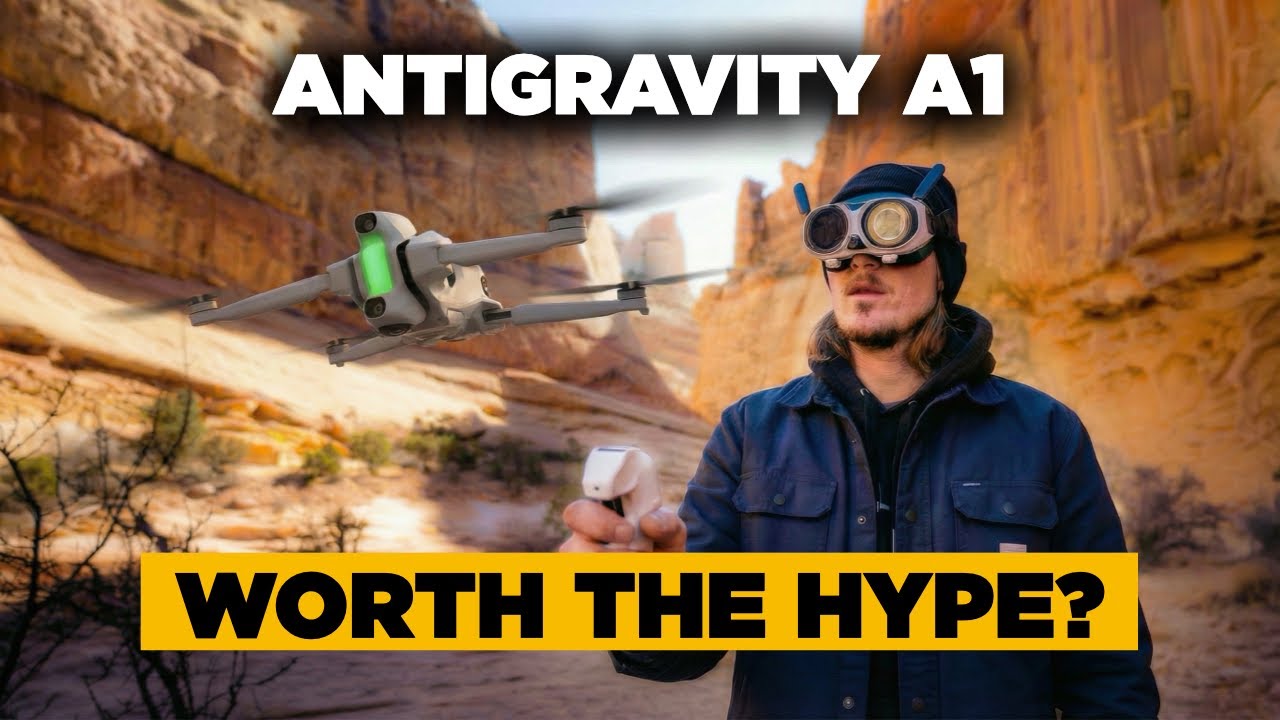
The Antigravity A1 has easily become one of the most talked-about gadget launches in recent memory. Co-engineered with the 360-degree software pioneers at Insta360, it promises to break the traditional flat screen mold by giving creators a full, zero-blind-spot spherical canvas in an ultra-light framework.
When you spend over a decade piloting remote crafts, you get used to incremental design shifts. Most new releases are just safe, predictable updates. But the A1 is a radical, first-of-its-kind machine.
That said, stepping into a first-generation technology ecosystem is always a gamble. Before you drop your hard-earned cash on this immersive flight setup, you need to look past the marketing reels. Here are the 10 cold, hard truths you need to know about the Antigravity A1.
1. It is Legally 249 Grams—But with a Huge Battery Catch
The absolute headline feature of the A1 is its weight. It ships at exactly 249 grams with its standard battery pack. In most global regions, staying below that 250g legal boundary means you clear the hurdle of forced registrations or mandatory pilot certifications. It is the definition of travel-friendly.
However, if you buy their high-capacity offering to push your flight window up to 39 minutes, that specialized battery adds extra mass. The moment you slide that extended cell into the frame, your takeoff weight officially punctures the 249-gram limit. Suddenly, you are operating a heavier class of aircraft and are subject to completely different registration rules depending on your local airspace.
2. The Goggles Internal Screen is Actually a Square
When you buy the A1 Explorer Bundle, it ships with the custom Vision goggles. Given that this is an 8K spherical platform, you might expect a sprawling, immersive widescreen viewport inside the glass.
In reality, when you put the headset on, the interior screens render a distinct, square aspect ratio. It looks slightly foreign at first, but it makes technical sense. The dual lenses are capturing a complete vertical and horizontal sphere, and a square screen is the most efficient canvas to display that raw multi-axis feed.
3. There is an Outer Video Screen (And It Looks Wild)
One of the most unique, eccentric hardware details on the Vision goggles is sitting on the outside of the headset. DJI goggles are solid blocks of plastic, but the A1 headset features an external display screen right on the front face.
When you are in the air, this exterior monitor plays a real-time mirror stream of exactly what your eyes are tracking inside the visor. If your friends or spotters are standing around the camp, they can look directly at your face and see your exact drone-eye view. It turns a traditionally isolating solo flight into a highly interactive, collaborative experience.
4. The Hanging Goggle Battery Pack Can Be a Pain
To keep the face weight down to a remarkably light 340 grams, Antigravity made a distinct ergonomic choice. Unlike headsets with a built-in battery compartment on the rear strap, the A1 runs its power via an external battery pack connected by a dangling cable.
You are forced to hang this battery pack around your neck or slip it into a jacket pocket while operating. While it can occasionally feel a bit annoying and cumbersome in the field, the massive positive is hot-swapping capability. If your goggles run low, you don't have to ground the drone—you just plug in a fresh external cell and keep rolling.
5. It is NOT a True FPV Stunt Drone
Because you use motion-tracking headwear and a singular hand grip controller to point and fly, it is easy to mistake this for a freestyle FPV manual racer. It isn't.
There is no full manual mode out of the box, no traditional split-stick layout, and the motion controller restricts your flight vectors to a strictly forward path. You cannot slide sideways, you cannot fly in reverse, and you cannot execute manual dives or acrobatics. The software is currently engineered to act as a smooth, automated panoramic sentinel, not a high-velocity stunt machine.
6. The "Invisible Drone" Stitching Mechanics are Flawless
The structural magic of the A1 comes down to lens orientation. The drone mounts two ultra-wide lenses precisely at the absolute apex of the top and bottom plates.
When the system triggers its automatic stitching algorithms—powered directly by Insta360’s veteran software processing—the entire body of the mini drone is completely deleted from the video file. The propellers, the motor arms, and the chassis disappear completely. Your final exports look exactly like a completely detached, floating camera sphere slicing cleanly through mid-air.
7. Real-World Output is Closer to HD than Crisp 8K
The retail box proudly boasts an 8K 360-degree video specification. While the sensor is genuinely capturing a massive 8K spatial map of the entire sky, you need to understand how that translation works in your editor.
When you sit down at your desk to crop that full sphere down into a standard flat 16:9 widescreen shot or a vertical 9:16 reel, you are only extracting a fractional window of that total canvas. Because you are heavily cropping into the frame, your final exported resolution realistically drops to anywhere between 1080p and 4K. The image quality looks solid and sharp, but it will never match the raw pixel clarity of a traditional non-360 drone lens pointed directly at a subject.
8. The App Workflow is an Absolute Masterpiece
Because a 360-degree drone forces you to evaluate and reframe every single clip you shoot, software design will make or break your workflow. This is where the partnership with Insta360 completely outclasses the competition.
The standalone editing suite and mobile app are exceptionally intuitive. Features like Deep Track let you draw a bounding box around a person or a moving vehicle, and the software automatically locks the horizon to keep them perfectly centered through the entire run. You can add dramatic camera pans, simulate barrel rolls, or trigger unique transitions post-flight using simple keyframes. It strips the frustration out of the edit.
9. Wi-Fi Transmission Has Serious Boundary Lines
Antigravity uses a standard real-time wireless system called OmniLink 360 to push the video feed back to your goggles. While the spec sheet claims up to 10 kilometers of maximum range under perfect, open FCC testing conditions, the real-world link has definitive boundaries.
Because it operates on a standard Wi-Fi architecture, the signal transmission remains completely stable only when you maintain a strict, unblocked line of sight. The second you try to navigate behind a heavy block of trees, a stone ridge, or a house, the feed inside the goggles can become noticeably staticky or jittery. It works beautifully for wide-open park and coastal exploration, but it cannot match the impenetrable signal mesh of DJI’s proprietary transmission systems.
10. The Price of Entry is Premium
The final truth lands square on your wallet. The cheapest, most basic ready-to-fly bundle for the Antigravity A1 carries a premium retail price of $1,599.
While that can trigger immediate complaints about cost, you have to break down what is actually inside the bundle. That price tags together the drone, the advanced motion controller, and a high-end set of FPV goggles. Goggles and specialized tracking optics are inherently expensive pieces of hardware to manufacture. It is a significant financial investment, but for creators who want a tool that can "fly first, frame later," it offers a creative pipeline that simply cannot be replicated by traditional aircraft.